Stop Paying $500/Month for AI Tools — ToolSuite Gives You 55+ of Them for $29.95
 Don Ninh · Jul 1, 2026
Let me be real with you for a second.
When I first started building my online business with AI, my monthly SaaS bill was absolutely out of control.
AdSpy here. Canva Pro there. ChatGPT Plus, VidIQ, HeyGen, Leonardo AI…
Before I knew it, I was spending over $500 a month on tools – and I wasn’t even using half of them at full capacity.
Sound familiar?
Here’s the problem: You NEED these tools to compete. You need ad intelligence, design software, AI writing, and video creation. But paying full price for each one individually is brutal, especially when you’re still in growth mode.
That’s exactly the gap ToolSuite is trying to fill.
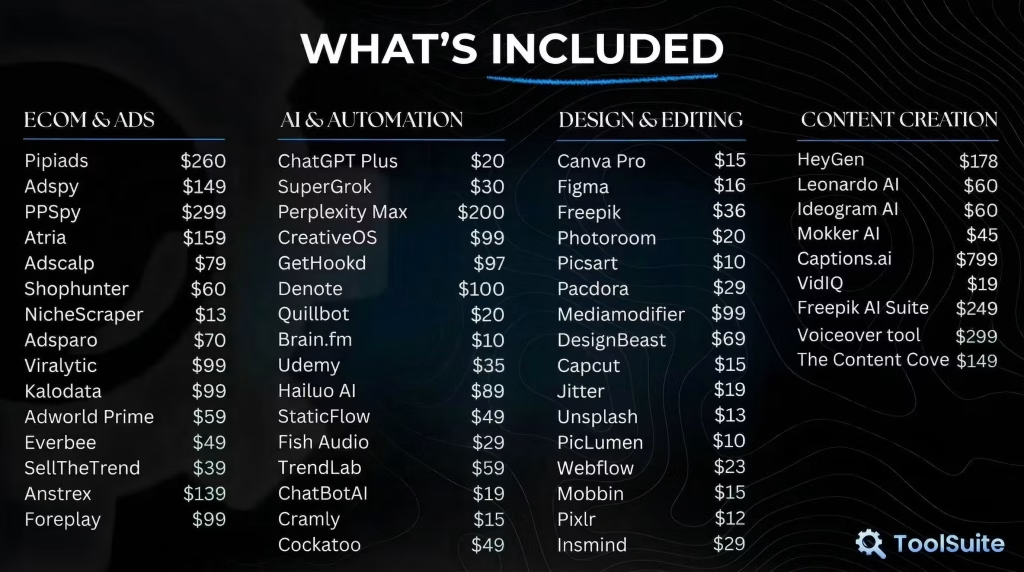
For a single flat fee of $29.95 per month, ToolSuite gives you shared access to 55+ premium tools under one login. One dashboard. One subscription. No juggling a dozen billing cycles.
But does it actually work? Is it legit? And – most importantly – is it worth YOUR money?
I dug deep into the platform, analyzed the real user reviews (including the negative ones), and broke everything down. Here’s my honest take.
👉 Try ToolSuite Monthly – $29.95/month, Cancel Anytime
👉 Go Lifetime and Never Pay Again – $349.95 One-Time
What is ToolSuite?
ToolSuite is a shared-access subscription platform built for e-commerce operators, content creators, digital marketers, and online entrepreneurs who need access to multiple premium SaaS tools – without paying full retail price for each one.
The concept is simple.
ToolSuite purchases premium licenses for 55+ popular tools, then gives its members centralized access through a private browser with a custom auto-login extension.
You subscribe once, open the dashboard, click any tool, and you’re instantly logged into a full premium account.
No separate billing. No password management. No sticker shock at the end of the month.
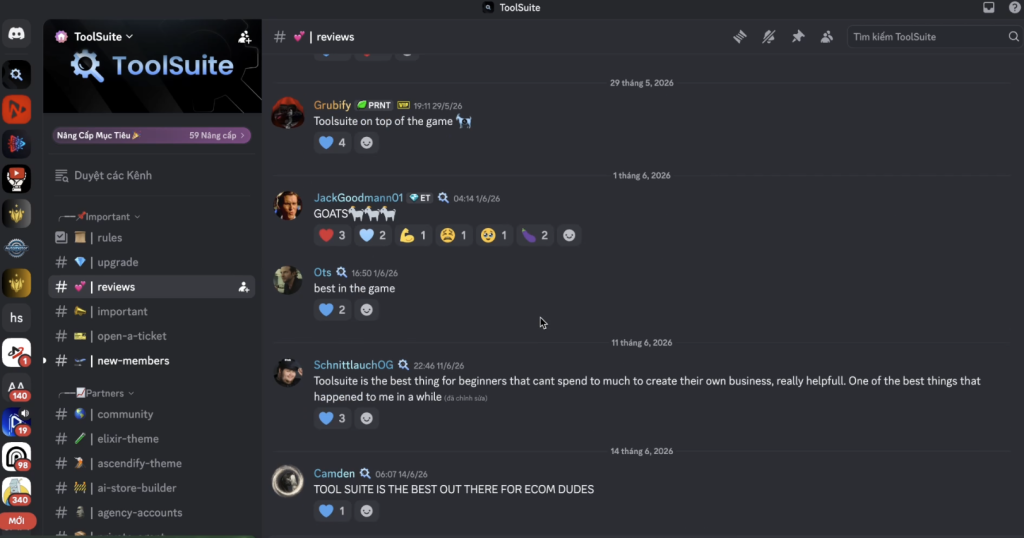
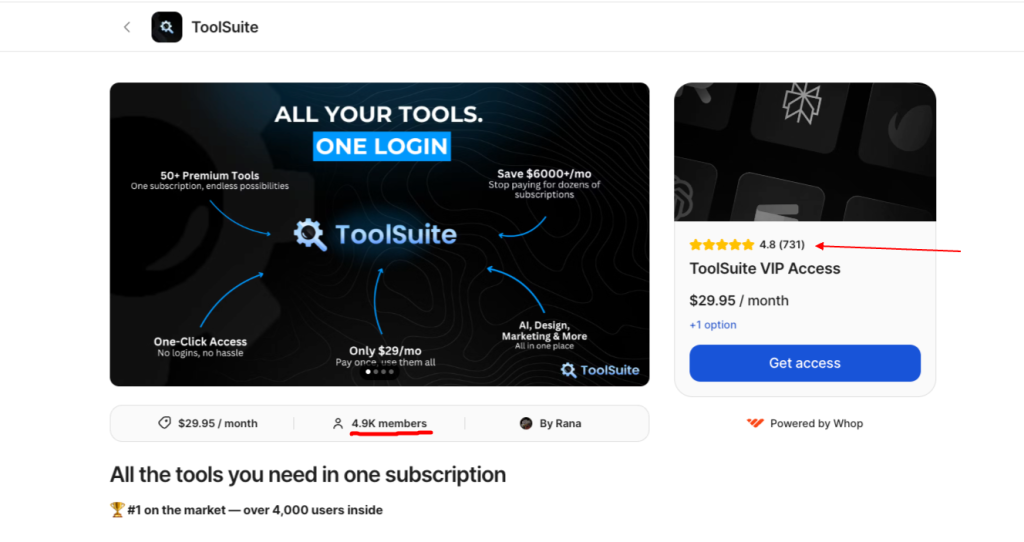
By mid-2026, ToolSuite has grown to nearly 5,000 active members, maintains a 4.78/5 rating from 731 verified reviews on Whop, and is trusted by major e-commerce communities including Rippy Club, Ecom Mafia, Evolve, Wealth Kings, and AdRevival.
Who Created ToolSuite?
ToolSuite was created by Rana (also known as Scalecord) and is hosted on the Whop platform.
Rana built the service around a straightforward promise: we pay for the tools, you get the access.
The platform has expanded from a small community experiment into one of the larger group-buy services operating in 2026, with a focus on e-commerce and digital marketing tools specifically.
Top Benefits of ToolSuite
- Massive cost savings: The tools in ToolSuite’s library would cost between $2,000–$6,000 per month if purchased individually at full retail price. At $29.95/month, the math is almost embarrassingly one-sided in your favor – as long as you’re actually using multiple tools.
- One login for everything: Instead of managing 15 different accounts, browser bookmarks, and two-factor authentication flows, you open one dashboard and click. That’s it. The auto-login extension handles everything in the background.
- No credit limits on most tools: Unlike some competing group-buy platforms that throttle usage, ToolSuite advertises no credit limits on the majority of its tools. You pay your subscription and use what you need.
- New tools added every month: The library isn’t static. ToolSuite actively solicits community feedback and adds new tools based on member requests, which keeps the offering relevant as new platforms emerge.
- Low barrier to entry: At $29.95/month with cancel-anytime terms, you can test it with minimal financial risk. If it doesn’t fit your workflow, you’re out less than the cost of a single month of AdSpy.
Best Features of ToolSuite
What makes ToolSuite stand out isn’t any single tool – it’s the breadth and combination of categories covered under one roof. Here’s what you’re actually getting access to.
E-Commerce & Ad Intelligence Tools
This is where ToolSuite genuinely shines for dropshippers and e-com operators. The full ecommerce category spans ad intelligence, product research, and store analytics:
- Signails – $150/mo
- Pipiads – $160/mo
- PPSpy – $299/mo
- Atria – $159/mo
- AdSpy – $149/mo
- GetHookd – $97/mo
- Adscalp – $79/mo
- Adsparo – $70/mo
- Shopunter – $60/mo
- Adworld Prime – $59/mo
- Viralytic – $99/mo
- Kalodata – $99/mo
- Foreplay – $99/mo
- NicheScraper – $13/mo
- ShopHunter
- Anstrex
- Everbee
- Helium10
- Milled
That’s 19 ad intelligence, product research, and store analytics tools. Just the top five – Pipiads, AdSpy, PPSpy, Signails, and Atria – would run you $1,217/month at retail.
That context makes $29.95 look almost ridiculous.
AI & Automation Tools
The AI & Automation category is stacked:
- Perplexity Max – $200/mo
- CreativeOS – $99/mo
- Hailuo AI – $99/mo
- Denote – $100/mo
- Trint – $89/mo
- StaticFlow – $49/mo
- Udemy – $35/mo
- HeavyGrok – $30/mo
- ChatGPT Plus – $20/mo
- Quillbot – $20/mo
- Brain.fm – $10/mo
- SuperGrok
- Cramly
For content creators and marketers who live inside these tools daily, the cost savings are immediate. Perplexity Max alone retails at $200/month – that’s nearly 7x the cost of a full ToolSuite subscription.
Stack in Denote, Trint, and CreativeOS on top, and you’re already looking at $500+/month from this category alone.
Design & Editing Tools
ToolSuite’s design library is the most comprehensive of any group-buy platform I’ve seen:
- Mediamodifier – $99/mo
- DesignBeast – $69/mo
- Freepik – $36/mo
- Paccora – $29/mo
- Photoroom – $20/mo
- Jitter – $19/mo
- Figma – $16/mo
- Canva Pro – $15/mo
- CapCut – $15/mo
- Unsplash – $13/mo
- Picsart – $10/mo
- PicLumen – $10/mo
- Webflow
- Mobbin
- Pixlr
Content Creation Tools
The Content Creation category covers everything from AI video generation to transcription and trend research:
- Freepik AI Suite – $249/mo
- Voiceover Tool (powered by ElevenLabs) – $299/mo
- HeyGen – $178/mo
- Captions.ai – $69.99/mo
- Leonardo AI – $60/mo
- Ideogram AI – $60/mo
- Mokker AI – $45/mo
- VidIQ – $19/mo
- Fish Audio – AI text-to-speech and voice cloning, 70+ languages
- Cockatoo – AI transcription in 90+ languages
- TrendLab – trending music analytics
- The Content Cove – vertical stock video clips for Reels and TikTok
Captions.ai’s top Scale plan retails at $69.99/month – and you still get access to it as part of a $29.95 subscription.
The design and content creation categories together cover virtually every step of a creator’s production pipeline.
One-Click Auto Login System
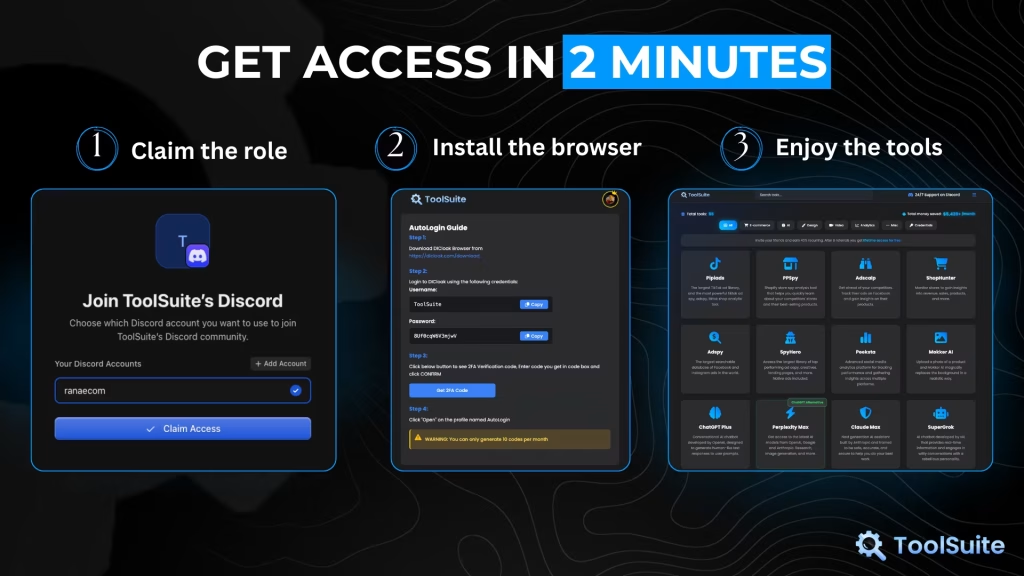
This is the feature that actually makes ToolSuite usable day-to-day. You download a private browser and custom extension – setup takes under 2 minutes – and from that point forward, clicking any tool in the dashboard automatically logs you into a full premium account.
No copying passwords, no authentication headaches. It just works.
Active Support and Community
ToolSuite operates inside a private Discord community with 24/7 active staff. According to the platform, most technical issues get resolved within minutes – not hours, not days.
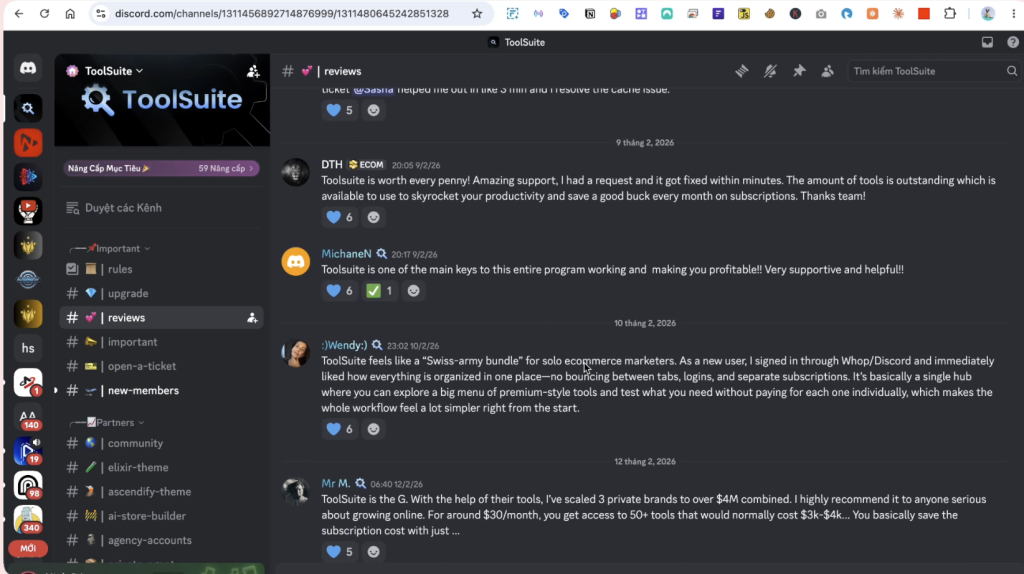
This matters because shared-access platforms occasionally need account refreshes, and response speed is the difference between a minor inconvenience and a deal-breaking experience.
ToolSuite Pricing
Before we get into the plans, here’s the number that matters most.
This is what the same tools would cost if you subscribed to them individually at full retail price:
| Category | Example Tools | Retail Cost |
|---|---|---|
| E-Commerce & Ads | Signails, PPSpy, Pipiads, AdSpy, Atria | $1,217/mo (top 5 alone) |
| AI & Automation | Perplexity Max, Denote, CreativeOS, Trint, ChatGPT Plus | $488/mo |
| Design & Editing | Mediamodifier, DesignBeast, Freepik, Figma, Canva Pro | $238/mo |
| Content Creation | Freepik AI Suite, Voiceover Tool, HeyGen | $726/mo |
| Total (select tools) | ~30 tools from the list | $2,000–$6,000/mo |
| ToolSuite | All 55+ tools | $29.95/mo |
ToolSuite keeps pricing straightforward.
| Plan | Cost | Notes |
|---|---|---|
| Monthly | $29.95/month | Cancel anytime |
| Yearly | ~$179.70/year (~$15/mo) | Save ~50% vs monthly |
| Lifetime | $349.95 (one-time) | Available via Whop |
ToolSuite now offers three tiers.
- The yearly plan is the hidden gem – at roughly $15/month, it saves you nearly 50% compared to billing monthly, without the commitment of going lifetime.
- The lifetime plan remains the best long-term bet: break even in under 12 months against the monthly plan, and everything after that is pure savings.
📌 Pro tip: Start with the monthly plan to test your actual usage patterns. If you’re using 3+ tools consistently after 30 days, upgrade to lifetime before any promo ends.
ToolSuite Pros and Cons
Every honest review has to go here. Let’s not skip it.
ToolSuite Pros
- Exceptional value for multi-tool users. If you’re already paying for even 2–3 of the tools in ToolSuite’s library, the monthly plan pays for itself immediately. The math is genuinely compelling.
- Broad category coverage. E-commerce research, AI writing, design, video creation, SEO – ToolSuite covers the core workflow categories most online businesses actually need.
- Strong community validation. Trusted by major e-com communities like Rippy Club, Ecom Mafia, and Wealth Kings. This isn’t a fly-by-night operation.
- Fast support. The team is known for quick turnaround on account issues – critical for a shared-access platform where things occasionally need refreshing.
- Low cancellation risk. Monthly billing with no lock-in means you can test it and exit cleanly if it doesn’t work for you.
To summarize: for bootstrapped entrepreneurs and small operators who need broad tool access at a fraction of retail cost, ToolSuite delivers real, measurable value. But there’s another side to this.
ToolSuite Cons
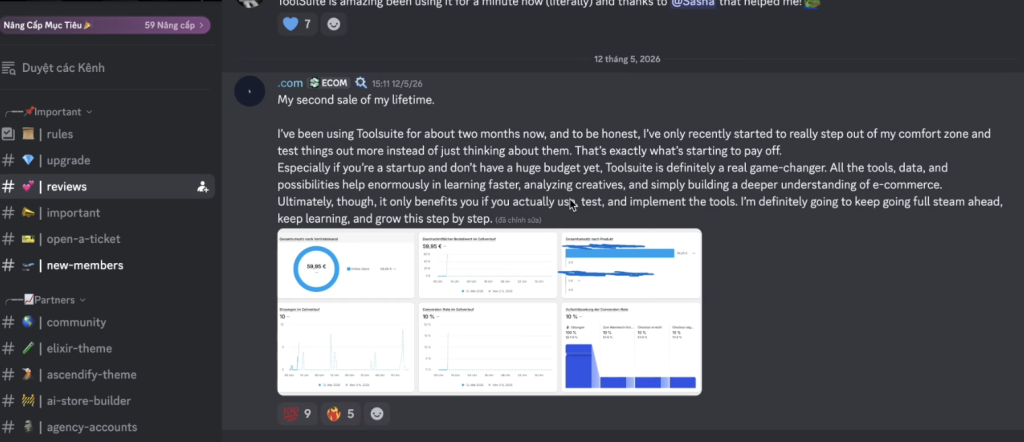
Shared access has real limitations. This is the fundamental tradeoff of the group-buy model. Looking at real user reviews from June 2026, some members reported that certain tools showed empty credits or were barely functional – particularly around peak usage hours.
That said, if a tool runs out of credits on your account, you can simply report it to the ToolSuite team and they’ll top it up – so it’s more of a minor inconvenience than a dealbreaker for most users.
It’s not individual account ownership: If you need guaranteed uptime, dedicated credits, or enterprise-level usage of a single specific tool, this model won’t satisfy that need. You’re sharing access with thousands of other members.
Requires a custom browser: Everything runs through ToolSuite’s private browser. This isn’t a dealbreaker for most people, but it adds a layer of friction for users who prefer native apps or standard browser workflows.
Account refresh dependency: When shared accounts get flagged or need refreshing, you’re dependent on ToolSuite’s support team to fix it quickly. The team is reportedly fast, but downtime does happen.
The honest summary: ToolSuite works well for the majority of its 4,900+ members. Like any shared-access platform, there’s always room to improve – particularly around tool availability and support response times. The team is actively working on it, and the credit top-up system helps. Go in with clear expectations and you’ll get solid value.
Who Is ToolSuite For?
ToolSuite works best for some people and genuinely doesn’t suit others. Here’s the honest breakdown.
Best fit:
- Dropshippers and TikTok Shop sellers who need ad spy and product research tools but can’t justify full-price subscriptions for each
- Content creators running YouTube channels who need design, Image/Video AI, and voiceover tools across a workflow
- Small teams and agencies where multiple people need access to the same tools simultaneously – one ToolSuite account covers everyone
- Freelancers and digital marketers managing several client projects who need broad tool access on a tight budget
- Beginners who want to experiment with premium tools before committing to individual subscriptions
Not a good fit:
- Enterprises that need dedicated accounts, formal SLAs, or compliance-level data separation
- Power users who depend on one specific AI tool with heavy daily credit usage at unlimited scale
- Anyone who needs guaranteed 24/7 uptime on a mission-critical workflow tool with zero tolerance for downtime
- Users who need native app experiences and aren’t comfortable working through a custom browser
If you fall into the first group, the math almost always works in your favor. If you’re in the second group, go buy the individual subscription – ToolSuite won’t serve you well.
ToolSuite Alternatives
If ToolSuite doesn’t feel right for your situation, here are the realistic alternatives worth considering.
- Individual subscriptions: The obvious option. Buy only what you actually use at full price. Better for power users who need unlimited, uninterrupted access to specific tools and can justify the cost.
- Other group-buy platforms: Similar group-buy providers operate in the same space. ToolSuite’s differentiator is its member count, e-commerce focus, and community endorsements – but alternatives exist if pricing or tool selection doesn’t match.
For most e-commerce operators and content creators in early-to-mid growth stages, ToolSuite remains one of the more cost-effective options in the group-buy category.
ToolSuite Bonus Resources: What Else You Get
Here’s something most ToolSuite reviews miss entirely.
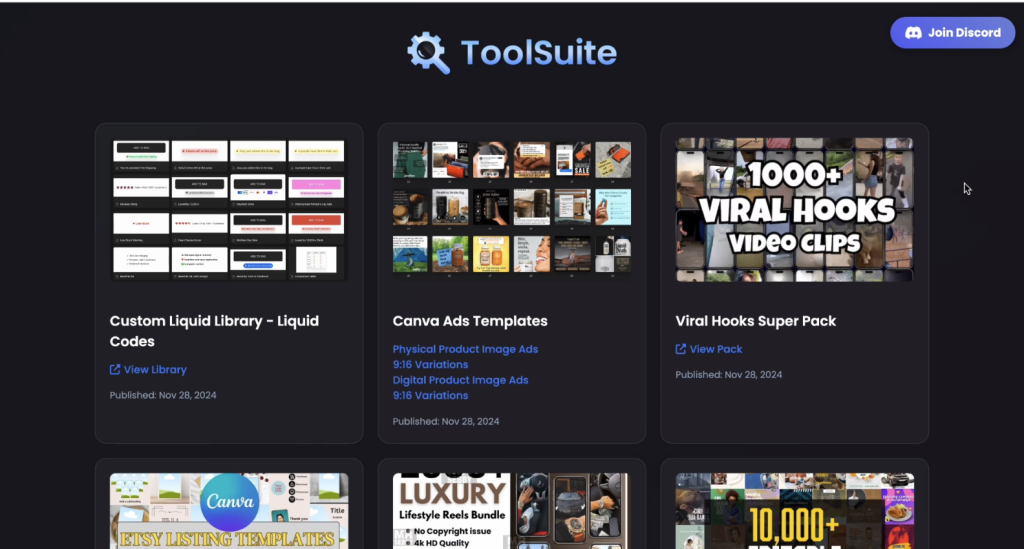
Beyond the 50+ tools, every member also gets access to a growing library of done-for-you assets included free with any subscription.
Here’s what’s currently inside:
Templates & Design Assets
- 10,000+ Canva Templates – Editable social media post and ad templates for Facebook, Instagram, Pinterest, and more (general social content, not just product ads)
- Canva Ads Templates – Dedicated ad-creative templates split by Physical Product and Digital Product image ads, including 9:16 vertical variations for Stories and Reels
- Etsy Listing Templates – Canva-based listing templates designed to sell on Etsy
- 3,000+ Editable T-Shirt Designs – Mega bundle in AI, PSD, EPS, SVG, PNG, JPG, and font formats
Video & Viral Content
- Viral Hooks Super Pack – 1,000+ ready-to-use video clip hooks for opening short-form content
- 1,000+ Viral Hook Clips – A second separate pack of 1,000+ hook clips (different set)
- 1,000+ Luxury Lifestyle Clips – 4K HD footage of cars, watches, yachts, and high-end lifestyle scenes. No copyright, no logo, no watermark, one-time access
- 13 Viral Video Scripts – Pre-structured scripts for Sales Conversion, Authority Building, and Engagement posts with a step-by-step production framework
Tech & Productivity
- Shopify Liquid Code Library – Drop-in code snippets for urgency badges, low-stock warnings, review stars, comparison tables, and more
- Giga Brain Notion Template – A ready-made Notion workspace for organizing ideas, content calendars, and knowledge
- Full Digital Products Collection – A Google Drive vault containing: Adobe Illustrator Assets, Adobe Photoshop Assets, Canva Social Media Templates, Digital Planners/Journals/Trackers, Fonts/SVGs & Icons, Lightroom Presets, MRR Digital Products (WordPress), and Premiere Pro Templates & Effects
None of these are sold separately. They come included with any ToolSuite plan – monthly, yearly, or lifetime.
To put it in context: the Luxury Lifestyle Clips alone are sold by stock footage sites for $200–$500+.
The T-Shirt Design bundle in similar marketplaces goes for $50–$150.
The Canva template packs run $30–$80 each.
Stack it all together and the bonus resources conservatively represent $500–$1,000+ in standalone value – on top of the 55+ tools you’re already getting.
It’s a genuinely useful add-on stack that most group-buy platforms don’t bother to include.
ToolSuite Case Study: My Experience Using It
Let me give you the real context here.
I’m the founder of Tube Operator – we operate 20+ YouTube channels across 30+ languages, with a content team that spans scriptwriters, editors, designers, and researchers.
At that scale, tool costs don’t just add up fast. They compound into a serious monthly overhead line item.
Before ToolSuite, my team was juggling individual subscriptions across Canva Pro, Pipiads, HeyGen, VidIQ, and several AI tools.
The combined bill was painful – and half the time, team members were sharing login credentials informally anyway, which created its own headaches.
I picked up ToolSuite specifically to give the team centralized, clean access to the tools they needed – without maintaining a dozen separate subscription seats.
The savings were immediate and significant. What we used to pay across multiple individual plans, ToolSuite covered for a fraction of the cost.
Here’s what actually worked well in practice: the auto-login system is genuinely frictionless.
The team could click into Pipiads, Canva, or ChatGPT Plus without waiting for password resets or dealing with 2FA loops.
For a team environment where multiple people are switching between tools throughout the day, that alone is worth a lot.
The consistency issue is real though. A handful of credit-based AI tools showed strain during peak hours – particularly tools used for video generation at volume.
For those, we still maintain individual subscriptions. But for research tools, design assets, and platforms the team dips into periodically rather than hammering daily, ToolSuite handles it cleanly.
My Honest Assessment
Think of ToolSuite as the smart infrastructure layer underneath your core stack – not a replacement for it.
Buy ToolSuite for the breadth.
Keep individual subscriptions for the 1–2 mission-critical tools your team runs hard every single day. That combination gives you the cost savings without the reliability risk.
Speaking from my own experience running a content team across 20+ channels – I bought ToolSuite for the team and it’s been worth every dollar.
The savings are real, the tools work, and the team hasn’t looked back. For the price point, the value is genuinely hard to beat.
If you have any questions before joining, reach out directly to the ToolSuite support team on Discord – they’re responsive. Or feel free to reach out to me directly.
I’m happy to answer questions and point you in the right direction based on what your team actually needs.
Conclusion: Should You Buy ToolSuite?
Here’s my honest bottom line.
Yes – with clear expectations.
ToolSuite delivers genuine value for the audience it’s built for: bootstrapped entrepreneurs, e-commerce operators, content creators, and marketers who need access to a wide range of tools without the financial pressure of paying full retail for each one.
The math is almost impossible to argue with.
$29.95 versus $2,000–$6,000 in individual subscriptions. Even if only 30% of the tools work reliably for your use case, you’re still ahead.
But you need to go in knowing this: it’s shared access. Credits can run dry on high-demand tools.
Support is needed for account refreshes. And based on recent reviews, the refund and cancellation process needs work.
If you’re a heavy power user who depends on unlimited AI generation or needs 24/7 guaranteed uptime for a specific tool – this isn’t the right fit.
Go buy the individual subscription.
But if you’re a scrappy, cost-conscious entrepreneur who needs broad access and smart resource allocation? ToolSuite is worth testing.
Start with the monthly plan. Evaluate your usage after 30 days. Upgrade to lifetime if the value is there.
Not sure yet? No problem – the monthly plan is low-risk enough to be a trial. Cancel anytime, no questions asked.
Already convinced?
Skip the monthly and go straight to lifetime. At $349.95 one-time, you break even in under 12 months – and after that, every month is pure savings.
👉 Start Monthly – $29.95/month, Cancel Anytime
👉 Get Lifetime Access – $349.95, Pay Once and You’re Done
FAQ
Is ToolSuite worth it?
For multi-tool users, absolutely. The savings against individual retail subscriptions are significant.
The caveat is that shared access means occasional limitations – particularly on credit-based AI tools. For light-to-moderate usage across multiple tool categories, the value is strong.
How can ToolSuite help with e-commerce?
ToolSuite includes some of the most powerful e-commerce intelligence tools available: Pipiads, AdSpy, PPSpy, Kalodata, and others.
These tools help you find winning products, analyze competitor ad strategies, and research market trends – all of which are critical for running profitable dropshipping or TikTok Shop operations.
Is ToolSuite legit?
Yes. It has nearly 5,000 active members, a 4.78/5 rating from 731 reviews on Whop, and community endorsements from established e-commerce groups.
That said, recent reviews (June 2026) include legitimate complaints about tool availability and the cancellation/refund process.
It’s a real platform with real members – but like any shared-access service, results vary based on usage patterns and timing.
What happens if a tool stops working?
ToolSuite’s support team operates 24/7 and reportedly resolves most issues within minutes.
The custom browser and extension system is designed to handle account refreshes automatically in many cases. However, downtime does occur, and you’re dependent on their team’s response speed when it does.
Is there a free trial?
No free trial is currently offered. However, the $29.95 monthly plan with cancel-anytime terms is low-risk enough to function as a trial. You can test it for a month and cancel if it doesn’t fit your workflow.
Who is ToolSuite NOT for?
Enterprise teams that need dedicated accounts with SLAs. Heavy daily users of credit-based AI tools who need unlimited generation. Anyone whose workflow depends on guaranteed 24/7 uptime for a specific critical tool.
Disclosure: This article contains affiliate links. If you purchase through our link, we may earn a commission at no additional cost to you. All opinions reflect genuine analysis based on platform data, verified user reviews, and personal evaluation as of June 2026.
Don Ninh is a Vietnamese entrepreneur who built 20+ YouTube channels generating 6B+ views and 7-figure yearly income from a $20 starting point. He's trained 10,000+ students in YouTube strategy and AI business building, and his work has been featured on CNN and major Vietnamese media. At Tube Operator, he shares the exact practitioner blueprint - not guru theory.